
The Best AI Tools for Product Managers in 2026
The AI tool landscape for product managers has grown faster than anyone’s ability to evaluate it.
New tools ship weekly. Each one promises time savings. Most PMs end up in one of two states: trying too many tools at once and getting no real leverage, or dismissing the category after a few disappointing attempts.
Neither response is deliberate.
The problem is not the tools. It is the lack of a clear way to evaluate where they actually create leverage inside a product workflow.
Instead of reviewing tools in isolation, my approach is to look at where AI meaningfully reduces effort across the work PMs already do, and where it does not.
The AI Leverage Stack for Product Managers
The useful way to think about AI tools is not as a list. It is as a stack.
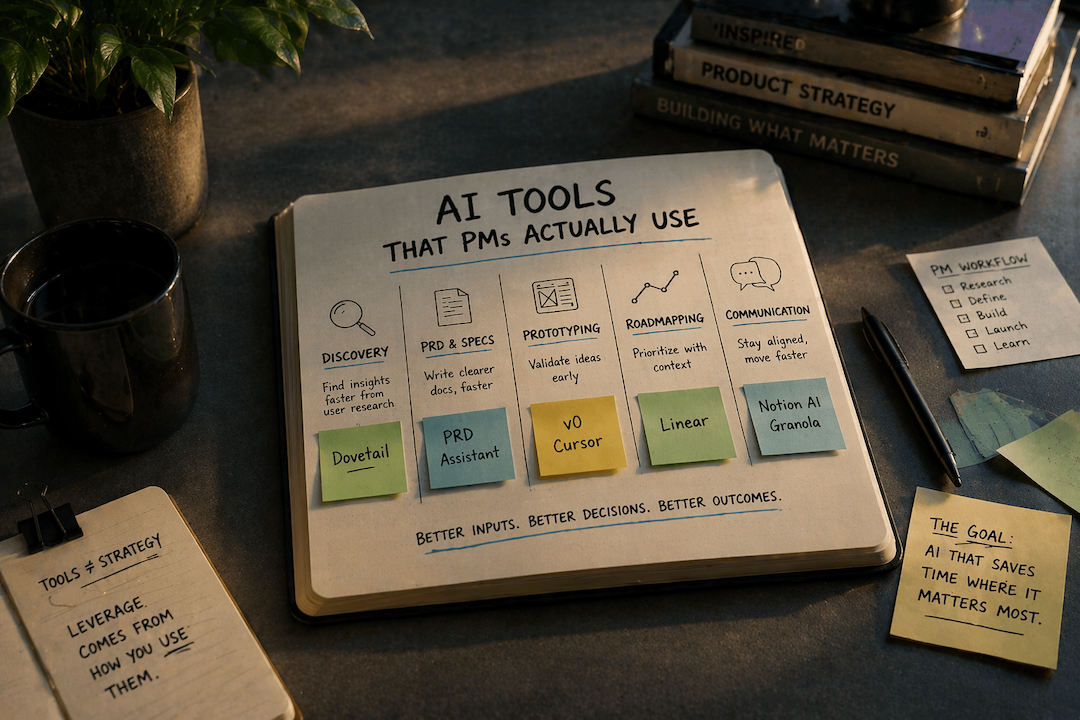
Each tool replaces or accelerates a specific layer of a PM’s workflow:
Discovery and research
Specification and documentation
Prototyping and validation
Prioritization and roadmapping
Communication and coordination
The goal is not to use more tools. It is to reduce the amount of time spent thinking from scratch in each layer.
Before looking at specific tools, there is a simpler filter that removes most of the noise.
How to Evaluate an AI Tool as a PM
Three questions worth asking before adopting anything:
1. Does it save time on a task a PM actually does repeatedly? Not a quarterly task. Not something a junior team member handles. A task that consumes PM time weekly.
2. Is it reliable enough to trust in a real work context? If editing the output costs more time than writing from scratch, the tool is a net negative. This is the filter that eliminates most general-purpose AI tools from serious consideration for specification writing and documentation.
3. Does it fit an existing workflow, or does it require building a new one around it? Tools that require new workflows have a higher adoption cost than most PMs account for. That cost has to be justified by proportional returns.
Keep these three questions visible as the recommendations follow. Two specific tools in this post fail at least one of them in specific contexts — and that trade-off is noted directly.
| # | Question | Why It Matters |
|---|---|---|
| 1 | Does it save time on a repeated task? Not a quarterly task. Not something a junior team member handles. A task that consumes PM time weekly — discovery synthesis, spec writing, stakeholder updates. | A tool that saves time once isn't a workflow tool. Evaluate against frequency, not novelty. |
| 2 | Is the output reliable enough to trust? If editing the output costs more time than writing from scratch, the tool is a net negative. This filter eliminates most general-purpose LLMs from serious consideration for specification writing. | Reliability is use-case specific. A tool can be reliable for summaries and unreliable for PRDs. Evaluate per task, not per tool. |
| 3 | Does it fit an existing workflow? Tools that require building a new workflow around them carry an adoption cost most PMs underestimate. That cost must be justified by proportional, measurable returns. | The higher the workflow disruption, the higher the bar. Most AI tools that require new habits don't survive the first month. |
Category 1: Discovery and Research
The job: Synthesizing user interviews, support tickets, and qualitative signals into something actionable before a planning session.
Recommended tool: Dovetail
Dovetail replaces the manual tagging and clustering work that typically takes hours before planning.
A PM coming out of a discovery sprint with multiple interview recordings can process them into:
Tagged themes
Frequency patterns
Supporting quotes
This creates a usable input for planning without rewatching or manually coding transcripts.
Genuine limitation: Dovetail's AI is strong at pattern recognition, weak at strategic relevance. It surfaces what customers said frequently — not what matters most given the organization's current focus. Applying the strategic constraint before synthesis is the PM's job. Without that constraint established in advance, the output is an accurate summary of the wrong signal.
This is a good example of the second evaluation question in practice: the tool is reliable, but only for the task it is actually designed to do. Using it as a substitute for problem framing produces volume, not direction.
Category 2: PRD and Specification Writing
The job: Translating a validated problem into a clear brief that engineering can act on without fifteen follow-up conversations.
Recommended tool: Purpose-built PRD tooling
General-purpose AI tools can produce outlines. They struggle with:
Defining constraints
Framing outcomes instead of features
Structuring documents for both humans and AI prototyping tools
Purpose-built tools are starting to close that gap by enforcing better problem framing and producing structured outputs that align with how teams actually build.
The difference shows up in downstream effects:
Fewer clarification conversations
Less scope ambiguity
Better inputs into prototyping tools
Where it breaks
When the problem itself is not well understood. No tool can compensate for unclear problem framing. AI amplifies the quality of the input. It does not replace it.
For the free structural foundation, start with my recommended PRD template — a Notion-based template built around the same customer-centric, outcome-focused principles. Use the template to understand the structure; use the AI PRD Assistant to produce it faster at consistent quality.
Category 3: Prototyping and Design Handoff
The job: Getting from concept to something visual fast enough to test assumptions before committing engineering time.
Recommended tools: v0 (Vercel) and Cursor
These tools solve two related but distinct problems.
v0 is most effective for interface-level work.
A PM who needs to show what a redesigned onboarding flow could look like can generate a credible UI concept from a structured description in minutes. It is optimized for front-end output: clean components, visually coherent layouts, and artifacts that can be handed off or translated into a React codebase.
This replaces the early-stage design exploration that typically requires back-and-forth before anything visual exists.
Lovable operates at a different level.
It produces working, interactive prototypes rather than static interface concepts. A PM can describe a product, iterate through conversation, and generate something that can be shared with users for validation without setting up a development environment.
For early-stage teams without dedicated design or engineering bandwidth, this compresses the path from problem validation to user testing significantly.
Where it breaks
The limitation is not output quality. It is how the output is interpreted.
Both tools produce artifacts that look finished. The reasoning behind them may not exist at the same level.
Treating these outputs as final deliverables removes the accountability that design and engineering processes provide. They are most useful at the front of discovery, where the goal is alignment and validation, not production readiness.
Lovable also has a practical boundary. It is effective for generating initial prototypes, but deeper customization eventually requires moving into a production codebase or involving engineering.
One non-negotiable for both tools: precision in the prompt. Vague natural language produces generic outputs that require more editing than they save. The skill floor here is higher than most adoption guides acknowledge. A PM who provides clear capabilities, explicit constraints, and defined success criteria gets a usable output. One who provides a loosely described idea gets a starting point that still requires significant judgment to refine.
Category 4: Roadmapping and Prioritization
The job: Keeping the roadmap current, connected to strategy, and readable by both engineering and leadership.
Honest assessment: this is the category where AI is most oversold relative to what it actually delivers today.
Most AI roadmapping features in tools like Productboard and Aha! are GPT wrappers that:
Summarize feedback
Generate themes
Cluster requests
These are useful, but they do not replace prioritization.
Prioritization requires:
Strategic context
Tradeoffs
Capacity awareness
AI does not have access to these constraints. Those are judgment calls that require strategic context. Treating AI-generated priority rankings as a substitute for that judgment introduces the same failure mode as treating any scoring model as objective: the output appears rigorous because it was produced through a visible process, which makes disagreement harder to express even when the underlying inputs remain subjective.
The one tool where the AI layer is genuinely useful: Linear
Linear’s AI focuses on organization rather than decision-making.
It helps with:
Grouping issues
Summarizing work
Drafting updates
These are tasks that consume time but do not require judgment.
That separation is what makes it useful.
Where it breaks
When AI output is treated as prioritization logic.
Summarized demand is not strategy. Frequency is not importance.
Category 5: Stakeholder Communication and Documentation
The job: Writing weekly updates, meeting summaries, release notes, and async documentation without losing three hours a week to formatting.
Recommended tools: Notion AI and Granola
Notion AI reduces the effort required to:
Summarize notes
Draft updates
Structure documentation
Granola focuses on real-time meeting capture:
Generates structured notes
Produces summaries with action items
Removes the need to choose between participating and documenting
Where it breaks
When the input lacks structure.
AI summarization reflects what it is given. Without clear notes on decisions, alternatives, and rationale, the output remains generic.
The quality of the input determines the usefulness of the output.
| Use Case | The Job to Get Done | Top Tool | Honest Watch-Out |
|---|---|---|---|
| Discovery & Research | Synthesize user interviews, support tickets, and market signals into something actionable before planning. | Dovetail | Surfaces frequency, not strategic relevance. Define your constraint before synthesis — not after. |
| PRD & Spec Writing | Translate a validated problem into a clear brief engineering can act on without 15 follow-up conversations. | AI PRD Assistant | General LLMs produce feature lists dressed up as PRDs. Purpose-built tools push back when framing is vague. |
| Prototyping & Design | Get from concept to something visual fast enough to test assumptions before committing engineering time. | v0 / Lovable | v0 for UI concepts; Lovable for a working deployed prototype. Neither is a design deliverable — both are conversation starters. Precise prompts required. |
| Roadmapping & Prioritization | Keep the roadmap current, connected to strategy, and readable by both engineering and leadership. | Linear | Most AI roadmapping features are GPT wrappers. AI can organize and summarize. It cannot make prioritization decisions. |
| Stakeholder Comms & Docs | Write weekly updates, meeting summaries, release notes, and async docs without losing three hours a week. | Notion AI / Granola | Output quality matches input structure. Front-load context before generating — vague source material produces vague summaries. |
What I Actually Use Week-to-Week
The full landscape is large. The practical set is small.
Dovetail is in every discovery sprint. When there is qualitative signal to synthesize, it is the first tool I open. The alternative is hours of manual tagging that produces approximately the same output.
The AI PRD Assistant is what I use when I need a PRD that works — not a template filled with placeholder language. The difference from prompting a general LLM is the push-back: it will not let a vague problem statement stand, and it structures the output for the prototyping tools the team is actually using.
v0 is useful for getting a concept in front of stakeholders before the design sprint. Not as a deliverable — as a conversation starter. The visual reference reduces the abstract back-and-forth that burns meeting time before anyone has seen anything concrete.
Granola runs in every meeting now. The alternative is choosing between participating and taking notes, which is a false choice PMs make all the time. Removing it from the equation matters.
Claude is the general-purpose layer underneath all of this. Not for PRDs, not for discovery synthesis — but for drafting, editing, structuring arguments, and the reasoning work that does not require a purpose-built tool. The more precisely I constrain the request, the more useful the output.
What I Skip
Some categories create the appearance of progress without improving outcomes.
AI-generated user stories and acceptance criteria. Every roadmapping and PRD tool now includes some version of this. The failure mode is consistent: the AI generates syntactically correct user stories that do not encode the tradeoffs, constraints, or edge cases that make a user story useful to an engineer. Editing them takes longer than writing from a clear problem statement. The time return is negative.
AI-powered OKR tools. Several tools now claim to help PMs write better OKRs using AI. In practice, they generate goal language that is measurable and well-formatted but disconnected from the actual strategic constraints the organization is operating under. A well-formatted OKR that does not reflect real organizational commitment is not better than a poorly formatted one — it is just more confident-sounding.
AI meeting transcription without synthesis. Transcription is a solved problem. The tools that stop at transcript without producing a structured summary require the PM to do the analytical work that was supposed to be automated. Evaluate tools in this category on the quality of the summary, not the accuracy of the transcript.
One Habit Worth Building First
If there is one place where AI produces consistent leverage, it is in specification writing.
Better inputs at this stage reduce:
Clarification cycles
Misalignment
Rework
The return compounds across the rest of the workflow.
Building AI Into Your Product Team's Operating Rhythm
Individual tools compound when they operate inside a deliberate structure. A PM who uses Dovetail for synthesis, the AI PRD Assistant for specifications, and v0 for prototyping has three useful tools. A team that has defined when each tool enters the workflow, who owns the constraint documentation before AI generation begins, and how AI-generated artifacts get reviewed has an operating advantage.
The structural model for building that rhythm — including how empowered teams should govern AI-accelerated discovery, the constraint infrastructure that prevents option inflation, and what governance needs to look like when every phase of the PDLC is accelerating simultaneously — is the subject of the product team operating model article. The tools work better when the operating infrastructure is in place.
The Decision That Matters Most
Tool selection is a smaller decision than it appears. Every tool recommended in this post can be evaluated in a single week with a real work task. The return compounds or it does not, and you will know within a few sessions.
The higher-leverage question is whether AI tooling is being adopted deliberately or by default. PMs who choose tools against a defined evaluation filter, commit to a short list, and apply them consistently inside an established workflow get proportional returns. PMs who trial everything and integrate nothing get coordination overhead instead.
Start with one category. Build the habit before adding the next tool.